A small internal training-request app showed me where vibe coding starts to break down.
The prompt was simple: build a quick React and NestJS app where colleagues can request trainings, certifications, books, or AI subscriptions, and Office Management can process them. PostgreSQL was optional, real authentication was out of scope, and the agent could make reasonable assumptions to keep moving.
The prototype appeared quickly. That was useful.
But the important part was not the speed or the code. It was the product and architecture decisions the agent made silently while filling the gaps in the prompt.
Main idea: Vibe coding is useful for disposable prototypes. It breaks down when the output becomes the foundation for a real software project.
But wait, What is Vibe Coding ?
My Definition: vibe coding means giving an AI agent a light description of intent, then letting it make most implementation and execution decisions on its own.
This can be useful when the goal is exploration: testing the rough product shape, not deciding the final architecture, permissions, storage, or deployment model.
When the goal is only to validate an idea, speed can be more valuable than structure.
The problem starts when the prototype is no longer disposable.
If the output is only used to learn, most shortcuts are acceptable. If we keep building on top of it, every shortcut becomes something we need to understand, clean, replace, or justify.
The issue is not that the AI writes bad code. The issue is that the AI can make too many hidden decisions.
The Prompt Gave the Agent Too Much Freedom
The important part of the prompt looked like this:
Use React for the frontend and NestJS for the backend, maybe PostgreSQL if needed, but don't spend too much time on setup. Just make it work locally first.

I need something simple:
- a page where a colleague can create a request
- a list of requests
- a way for office management to change the status
- make the UI clean and modern

For login, don't implement real auth now, maybe add a simple way to switch between colleague and office management.

If something is unclear, just make a reasonable assumption and continue. We can fix it later.
Nothing here looks obviously wrong. It gives intent, stack preferences, a few features, and permission to continue when details are missing.
The risky part is this sentence: "make a reasonable assumption and continue."
Reasonable according to what?
The prompt did not define what "reasonable" meant: speed, architecture, workflow, security, or testing.
So the agent optimized for what was easiest to continue with.
Prompt risk: When we ask the agent to make reasonable assumptions, we also need to define what "reasonable" means.
Three Decisions the Agent Made
1. Persistence
Because the prompt said "maybe PostgreSQL if needed" and "don't spend too much time on setup," the agent skipped PostgreSQL and used a small file-backed data store.
For a demo, that was not irrational. The repo was empty, and file storage made local setup faster.
But the real app needed PostgreSQL and maybe Prisma. The data model was not only a form and a list. It included request ownership, statuses, Office Management assignment, comments, renewable subscriptions, and later audit-like behavior.
Lesson: A vague technical preference is not an architecture decision. If the database matters, the prompt or spec has to say that clearly.
2. Product shape
The vibe-coded UI had a create request form, a list of requests, status counters, a refresh button, and a switch between colleague and Office Management.
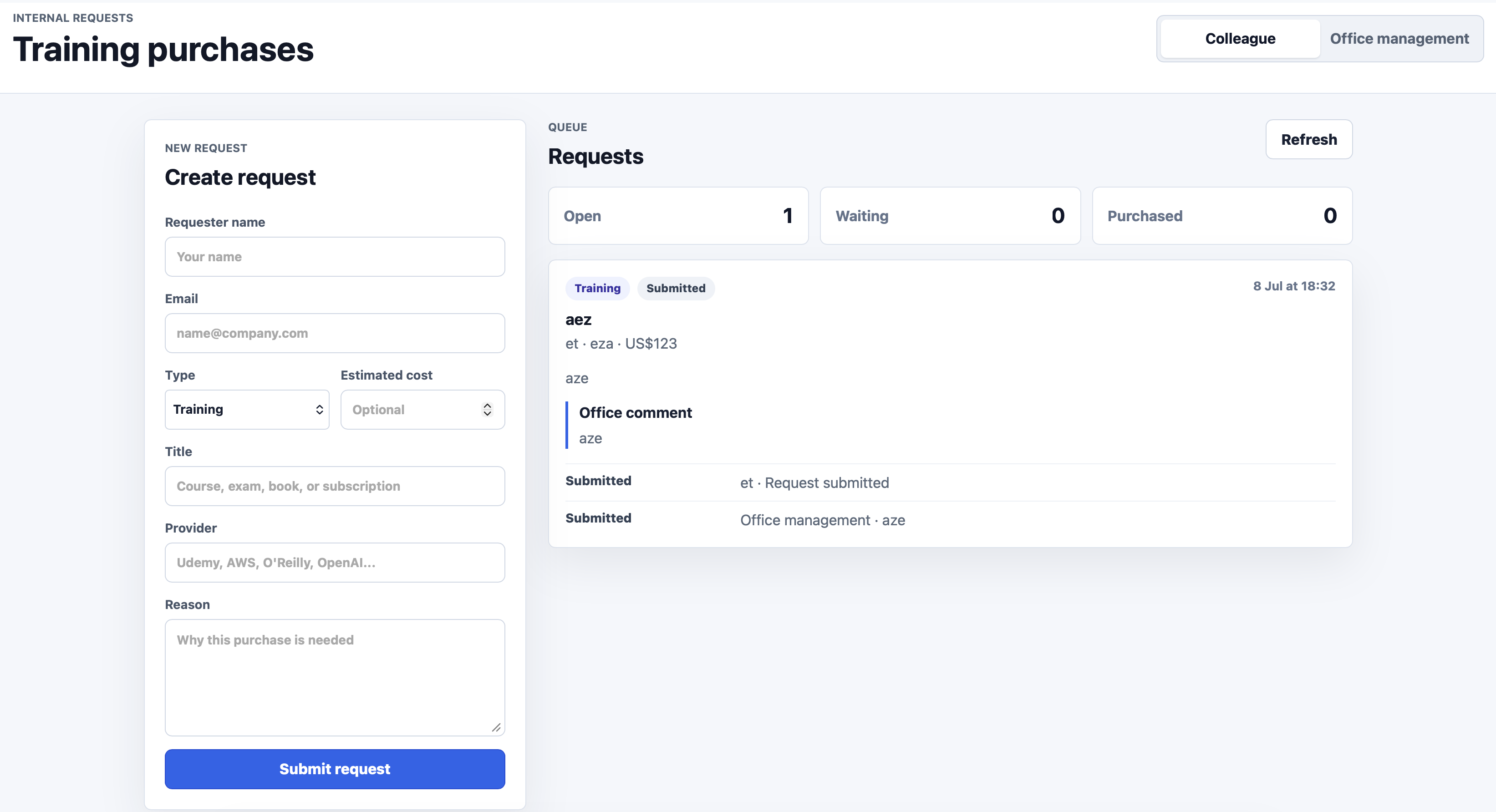
It looked like an app, but it did not feel shaped by the workflow.
The colleague side and Office Management side were collapsed into the same screen. The role switch made the demo easy, but it also delayed real product decisions: ownership, permissions, navigation, assignment, and separate user spaces.
The colleague needs to create requests, track status, see renewable subscriptions, and manage accounts. Office Management needs a queue, requester context, filters, processing states, and ways to claim work.
UI note: "Clean and modern" describes style. It does not describe workflow, roles, permissions, or product model.
3. Verification
The app looked ready at first glance, but the browser showed an internal server error when loading requests. The endpoint returned a 500 error.
The agent did not catch it because browser verification was not available in that session. The checks stayed closer to the server and endpoint level, and the user-facing failure was missed.
Verification rule: A dev server responding or an API endpoint check is not the same as the user workflow working. The check has to match the risk: server checks do not prove browser workflows.
The Problem Was Silent Decisions
The easy conclusion would be: vibe coding is bad.
I do not think that is the right conclusion.
The prototype had value. It helped me inspect the idea quickly. The problem was that the agent made decisions that were reasonable for speed but risky as a foundation:
- Persistence: file-backed storage instead of PostgreSQL
- Product model: generic UI instead of workflow-shaped screens
- Role model: a role switch instead of separate user spaces
- Identity: no real multi-user model
- Verification: endpoint-level checks while the browser still showed an error
These are not only implementation details. They are product, architecture, data, testing, and UI decisions.
If I notice them early, I can throw away the prototype and start clean. If I notice them late, after more features are built on top, cleaning the app may become more expensive than rewriting it with better constraints from the start.
Vibe coding is cheap when the output is disposable. It becomes expensive when we keep building on top of decisions we did not intentionally make.
What Specs Changed
In the spec-driven version of the same app, the result had a different shape.
It was not only better code. The product itself was different.
The Office Management side had its own queue and board. It exposed work assignment, requesters, statuses, filtering, renewable subscriptions, and claim actions.
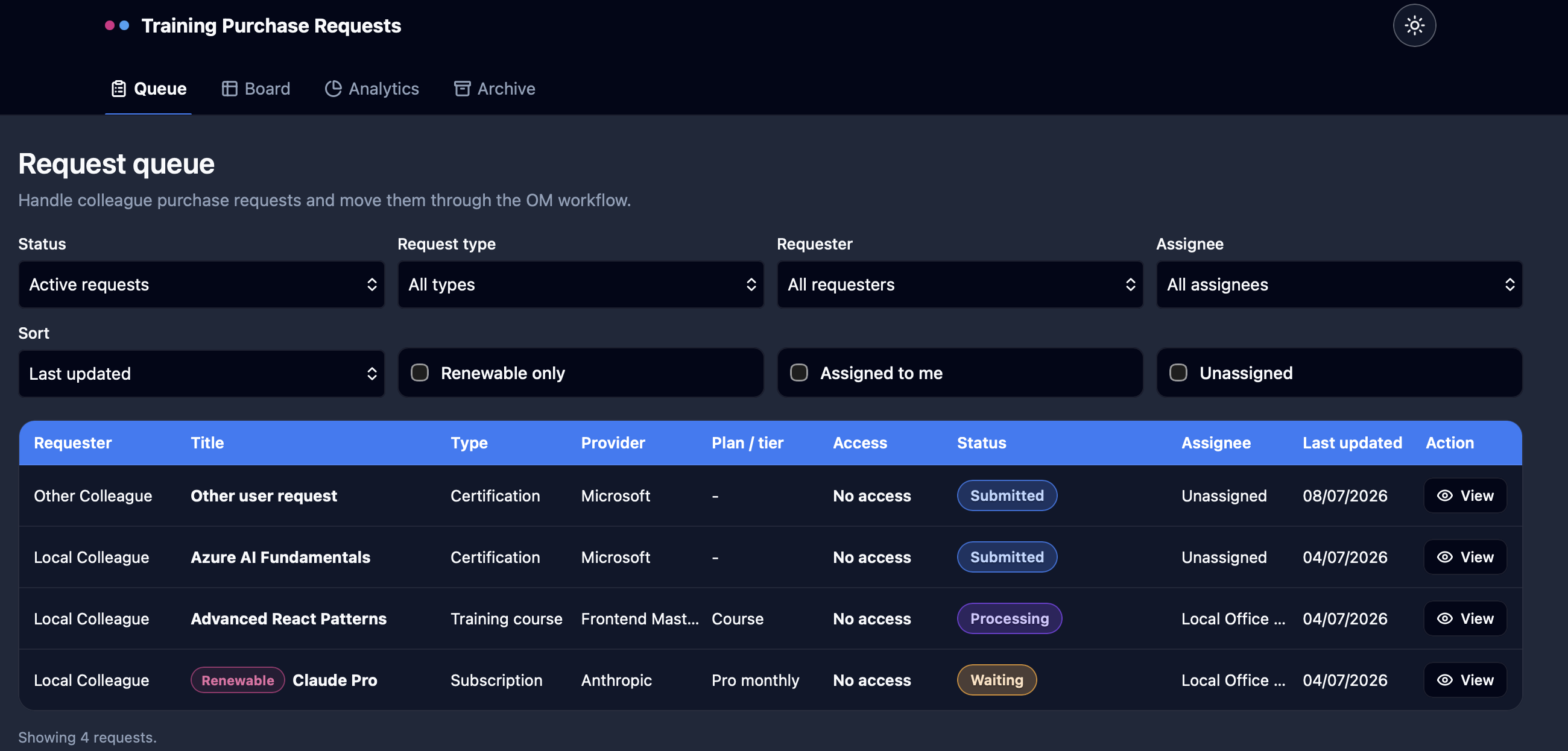
Even the local login shortcut was treated differently. There was a local persona selector for development and testing, but it was scoped to the login page. It was not presented as the real product model.
Spec-driven development does not mean avoiding shortcuts. It means naming them and putting them in the right place.
The same idea applies to storage, verification, UI, and workflow. When the spec says what matters, the agent has a smaller decision space. It can still write the code, but it is less likely to silently choose a different product.
Spec effect: The spec does not replace the agent. It reduces the decisions the agent is allowed to make silently.
The Takeaway
My takeaway from this experiment is simple.
Vibe coding is useful when I want a quick prototype that I can throw away.
It breaks down when I treat that prototype as the foundation of a real software project.
The issue is not that the AI is bad. The issue is that a light prompt gives the agent too much decision space. It fills the gaps with assumptions, and many of those assumptions are reasonable for speed but wrong for the actual system.
So the next question is not whether we should use AI coding agents.
We definitely SHOULD.
The next question is simple: If a light prompt gives the agent too much decision space, what should replace it?
For me, this is where specs start to matter.